
In today’s growing Digital Marketing world attracting visitors to your website is only half the challenge. The hardest part is getting those visitors to buy something, especially the ones who leave without taking any action on your site. In this situation the retargeting ads help you reconnect with people who might be interested in your product by showing them ads that are relevant to them as they browse other websites and platforms.
Keeping your brand in front of users and reminding them of their initial interest helps turn visitors into customers. Retargeting increases engagement and makes it more likely that they will buy something.
In this blog, we will explore what retargeting ads are and how they work.
What Are Retargeting Ads?
Retargeting ads are also called remarketing ads which are a form of online advertising that allows businesses to reconnect with people who have already visited their website or interacted with their brand in some way. Instead of showing ads to a random audience, retargeting focuses on people who have already shown interest — making it one of the smartest tools in digital marketing.
Picture this: You visit an online store, browse a pair of sneakers, and then leave without buying. A few hours later, while scrolling through Instagram or reading the news, an ad for those exact sneakers appears. That is not a coincidence. That is retargeting in action.
Here is a striking fact: 96% of first-time visitors leave a website without making a purchase. Retargeting is the strategy that helps businesses get back in front of those visitors and nudge them toward completing an action.
Whether you run a small business or manage marketing for a large brand, understanding retargeting is essential in today’s crowded digital space.
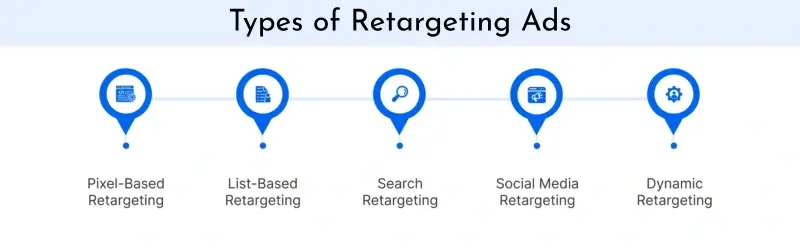
Types of Retargeting Ads
Not all retargeting works the same way. Different types serve different goals. Here is a breakdown of the most common ones and when to use each.
Pixel-Based Retargeting
How it works: A tiny invisible piece of code (called a pixel) is placed on your website. When a visitor lands on your site, the pixel drops a cookie in their browser. This cookie then triggers your ads to follow them across the internet.
Best for: E-commerce stores, businesses with high website traffic, and anyone wanting to retarget visitors almost immediately after they leave.
Why use it: It is highly specific. You can target people based on exactly which page or product they viewed, making the ads feel personal and relevant.
List-Based Retargeting
How it works: You upload a list of email addresses (from your CRM or newsletter subscribers) to an ad platform like Facebook or Google. The platform then matches those emails to user accounts and shows your ads to those specific people.
Best for: Re-engaging cold leads, lapsed customers, or people who signed up but never converted.
Why use it: You have full control over your audience. This is great for highly targeted campaigns because you are working with people you already know.
Search Retargeting
How it works: This targets people based on keywords they have searched for on Google or Bing, even if they never visited your site.
Best for: Capturing new, high-intent customers who are actively looking for products or services similar to yours.
Why use it: It expands your reach beyond your existing audience and targets people at the exact moment they are searching for what you offer.
Social Media Retargeting
How it works: Platforms like Facebook, Instagram, LinkedIn, and TikTok allow you to retarget users based on their interactions with your website, app, or even your social media profile.
Best for: Brands with strong social media presence or those wanting to use visual, engaging ad formats.
Why use it: Social media is where people spend a significant chunk of their time. Meeting them where they hang out increases the chances of engagement.
How Do Retargeting Ads Work?
Let us walk through the process in simple steps, so even if you have never run a single ad, you will understand exactly what happens behind the scenes.
- Step 1 — A Visitor Lands on Your Site: Someone clicks on a link or types in your URL and arrives at your website.
- Step 2 — The Pixel Fires: The tracking pixel on your page activates and places a cookie in the visitor’s browser. This cookie is essentially a digital bookmark that says, “this person visited this site.”
- Step 3 — The Visitor Leaves: Without making a purchase, the visitor moves on to other sites or apps.
- Step 4 — The Ad Platform Takes Over: Your ad platform (Google Ads, Meta Ads, etc.) identifies the cookied visitor browsing elsewhere and serves them your ad.
- Step 5 — The Visitor Returns: Reminded of your product or offer, the visitor clicks the ad and comes back to your site — this time, often converting.
The whole process is automated and runs continuously in the background. Once your campaign is set up and live, it works for you around the clock without manual effort.
Advantages and Disadvantages
Advantages
- Higher Conversion Rates: You are targeting warm leads — people who already know your brand. They are far more likely to convert than a cold audience.
- Cost-Effective: Because the audience is pre-qualified, retargeting ads typically deliver a better return on investment compared to broad prospecting campaigns.
- Better Brand Recall: Repeated exposure to your brand keeps you top-of-mind. Even if a user does not click immediately, they are more likely to remember you when they are ready to buy.
- Highly Targeted: You can segment audiences based on specific behaviors — people who visited a pricing page, added to cart, or spent a certain amount of time on your site.
- Supports Every Stage of the Funnel: From awareness to decision-making, retargeting can be customized for any point in the buyer journey.
Disadvantages
- Ad Fatigue: Showing the same ad to the same person too many times can get annoying. Users may start to ignore or even resent your brand if they feel followed.
- Privacy Concerns: As awareness around data privacy grows, some users block cookies or opt out of tracking entirely. This limits the reach of cookie-based retargeting.
- Cookie Restrictions: Major browsers are moving away from third-party cookies. Marketers need to start preparing for a cookie-less future by exploring alternatives like first-party data and server-side tracking.
- Requires Traffic Volume: Retargeting works best when you have a steady stream of website visitors. If your site is brand new with very little traffic, the audience pool will be too small to run effective campaigns.
Configuration: How to Set Up a Retargeting Campaign
Setting up a retargeting campaign does not have to be intimidating. Here is a beginner-friendly guide to get you started.
Step 1: Choose Your Platform
Start with the platform where your audience spends most of their time. Google Ads is great for reaching people across the web, while Meta (Facebook/Instagram) is ideal for visual and social-based campaigns. LinkedIn works best for B2B audiences.
Step 2: Install Your Tracking Pixel
Each platform provides a pixel or tracking tag. For Google, it is the Google Ads tag. For Meta, it is the Meta Pixel. You place this code on every page of your website — usually in the header section. If you use platforms like Shopify or WordPress, this can often be done with a plugin or native integration in minutes.
Step 3: Define Your Audience Segments
Not every visitor deserves the same ad. Segment your audience based on behavior. Some useful segments include:
- All website visitors (broad re-engagement)
- People who visited a product or service page
- Users who added a product to the cart but did not check out (cart abandoners)
- Past customers (for upselling or loyalty campaigns)
Step 4: Create Your Ads
Design ads that are relevant to each segment. A cart abandoner might respond well to an ad with a discount code. A homepage visitor might need a more awareness-driven ad that introduces your brand value. Use clear visuals, a compelling headline, and a strong call-to-action like “Shop Now” or “Claim Your Offer.”
Step 5: Set Frequency Caps and Duration
To avoid bombarding users, set a frequency cap — for example, no more than 5 impressions per user per week. Also decide how long someone stays in your retargeting audience. A 30-day window is common, but for longer consideration cycles (like real estate or software), you might extend it to 90 or 180 days.
Step 6: Monitor and Optimise
Once your campaign is live, track key metrics: click-through rate (CTR), conversion rate, and return on ad spend (ROAS). A/B test different creatives, headlines, and audience segments regularly. What works for one segment may not work for another, so keep refining.
Final Conclusion
Retargeting ads are not just a clever marketing trick — they are a fundamental part of how successful businesses stay visible and convert interested visitors into paying customers.
In a world where most people do not buy on their first visit, retargeting gives you a second chance — and often a third, fourth, or fifth — to make your case. When done well, it feels less like an intrusive ad and more like a helpful reminder at exactly the right moment.
The key is balance.
- Be persistent, but not pushy
- Be relevant, but not creepy
- Use the right message for the right audience at the right time, and you will see a meaningful difference in your results.
Whether you are a startup owner just getting into paid advertising or a marketer looking to improve campaign performance, retargeting is one strategy that consistently delivers results when executed thoughtfully.